On this page
Run your own
Farcaster node.
Run a Snapchain node on AWS. Use Relay on your computer to read casts, post and follow people.
Three commands start the setup. Mainnet sync takes hours, and the AWS server costs money.
How the pieces connect
Farcaster is the social protocol. Snapchain keeps its shared social data in sync. Relay is the client we built to use it.
This website
Explains the setup. It is hosted on Vercel and never connects to your node or asks for wallet keys.
Your computer
Runs the Relay client and local proxy. An encrypted SSH tunnel connects them to your server.
Your AWS server
Runs a Snapchain read node. It stores network state, answers queries and forwards signed actions to validators.
- Relay clientAsk for casts
- Local proxyPass the request
- SSH tunnelEncrypted connection
- Your nodeReturn stored data
Enter an FID in Relay. The node returns that account’s casts through the same connection. Relay displays them in your browser.
- Relay clientSign your cast
- Local proxyPass signed bytes
- SSH tunnelEncrypted connection
- Your nodeCheck and relay
- ValidatorsCommit a block
Your node follows the committed block. Relay checks for the matching result before confirming the post. “Accepted for relay” alone is not confirmation.
A read node can relay writes. It follows committed blocks but does not vote on them. Running one does not make you a validator or earn validator rewards. Read about node roles.
Before you start
Run the commands on your computer. The helper handles the new server.
- Install the local tools. Use macOS, Linux or WSL2. You need Git, Python 3.9+, OpenSSH and Node.js 22.12+ or a newer supported LTS. The new-server path also needs AWS CLI v2 with your AWS account configured.
- Get repository access. The repository is private. Ask the owner for access before cloning. There is no public source download.
git clone https://github.com/vrajdesai78/farcaster-bounty.git
cd farcaster-bountyCheck the installed tools before creating a server:
python3 --version
node --version
npm --version
ssh -V
aws --version
aws sts get-caller-identity
The last command should identify your intended AWS account. It does not create resources. Keep that output private. If it fails, finish AWS CLI configuration first.
What will AWS create and charge for?
One Ubuntu 22.04 m5.xlarge server: 4 vCPU, 16 GB RAM and a 2,000 GiB encrypted gp3 disk at 3,000 IOPS / 125 MiB/s. The helper also creates an SSH key pair and security group. It uses an existing default VPC/subnet. It creates no NAT gateway, load balancer or paid monitoring.
You pay for compute, the full provisioned disk, public IPv4 and applicable transfer/taxes. Stopping the server leaves disk charges. No automatic shutdown is installed. Review the AWS calculator before provisioning.
Which AWS permissions and network access are needed?
Your AWS identity needs EC2 describe, key-pair, security-group, instance-launch and tagging permissions, plus ssm:GetParameter to find Ubuntu’s public image. Cleanup needs stop/terminate and key-pair/security-group deletion permissions. The exact actions are listed in the repository’s SETUP.md.
SSH is restricted to your public IPv4 /32. Peer ports UDP 3382 and TCP 3383 are public. The node’s HTTP API and metrics stay on the server’s loopback interface. AWS credentials stay on your computer.
Reading needs no Farcaster account. Posting needs a disposable FID with active account storage and its custody wallet. Owning a server does not create an account or pay for its storage.
Three commands
Use a new AWS server, or connect to a node you already run.
Keep the same repository folder and saved state when resuming an interrupted setup.
Find it at checkip.amazonaws.com. /32 is added to restrict SSH to that address. This page only puts the value in your command.
Requires a node already running at /opt/snapchain. This option only checks it; it does not install or restart anything. --remote-dir selects a different location.
Create the server
./relay provision --ack-costs --ssh-cidr YOUR_IP/32Creates paid AWS resources in us-east-1 by default. Saves server details and the private SSH key in .relay-state/.
Start Snapchain
./relay nodeInstalls Docker and starts the pinned node. Snapshot restore begins on the server.
Start the client
./relay clientOpens the SSH tunnel and starts Relay at 127.0.0.1:5173. Keep this terminal running. Reads may fail until sync finishes.
Run these from the repository folder on your computer.
Preview the plan before spending money
After filling in your IPv4, copy this command. The preview makes no AWS calls and creates nothing.
./relay provision --ack-costs --ssh-cidr YOUR_IP/32 --dry-runTo choose another AWS region or profile, add --region REGION or --profile PROFILE. Without a default subnet, supply --subnet-id SUBNET for an existing internet-routed subnet.
Wait for sync
A running container is not a synced node.
- DownloadGet snapshot chunks.
- RestoreDecompress and write the database.
- Catch upApply blocks created since the snapshot.
This can take hours. Quiet extraction logs can still mean work is progressing. Check bounded logs before restarting:
./relay logsIn a second terminal, from the same repository folder, check readiness:
./relay status --verify| Check | Result |
|---|---|
Each shard’s blockDelay | Below 10 seconds in both samples |
Each shard’s maxHeight | Advances across samples taken 15 seconds apart |
| Real query | A cast comes back from your node |
Shards are separate lanes of the chain. Check every reported shard. The helper saves the result in .relay-state/sync-evidence.json. API errors during restore are possible; they do not establish whether restore is progressing.
Use the client
Start with a read. Then authorize a test account and make one round trip.
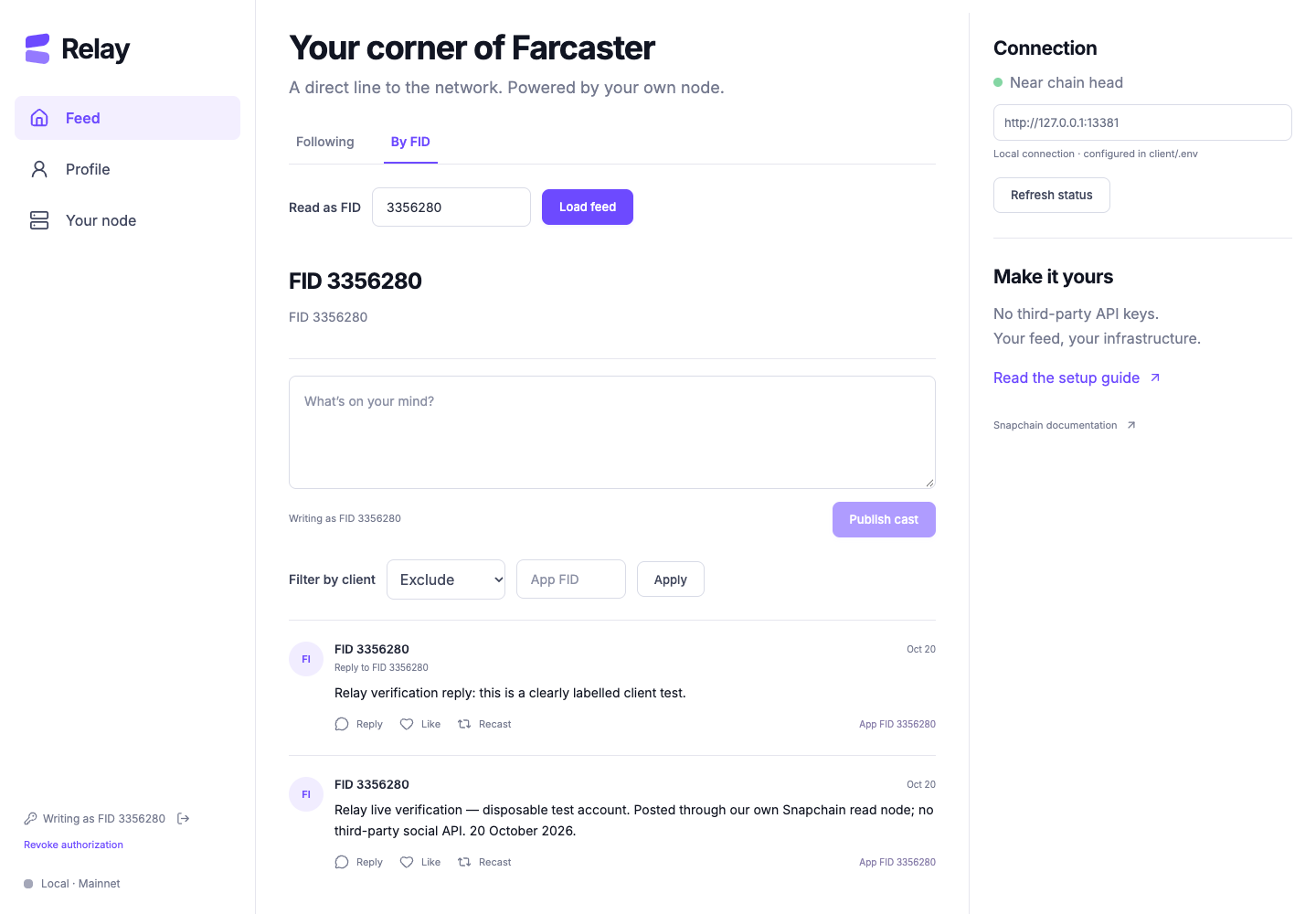
- Read casts. Open your local client. Choose By FID, enter
3356280and load the two labelled test casts. Try Following for another account. It combines recent casts from followed accounts in bounded batches, in chronological order. - Authorize your test account. Choose Connect signer → Browser wallet. Use the custody wallet for your own FID with active storage. Two wallet signatures approve a scoped app key. Adding this key is gasless; creating an FID and buying storage are separate paid steps.
- Post and read it back. Write “Testing my own Farcaster node.” Relay signs it in the browser, sends it to your node and waits for confirmation. Load your FID and check the cast appears.
- Try a reply, reaction and follow. Reply to your cast. Like it, then unlike it. Recast and undo. Follow a test target, check the result, then unfollow.
- Filter by app. Enter a requesting app’s FID and choose Include only or Exclude. With our self-authorized flow, use your own FID. Unknown or removed signer attribution is left out of filtered results.
- Revoke the test key. Forget clears this device’s session. Revoke cancels the key’s network authorization too. A revoked key should fail if imported again.
“Open local client” opens your own computer’s port 5173. It works after ./relay client is running. Vercel hosts this guide; it does not run your client proxy, SSH tunnel or node.
I need a new test account or already have a signer
The client authorizes an existing FID. Repository collaborators can follow SETUP.md → Optional new disposable account to create one separately. A new account needs ETH on OP Mainnet for registration and storage. Your node does not waive those costs.
Existing signer accepts a registered 32-byte Ed25519 app key. It is different from a custody-wallet private key. Prefer the browser wallet for authorization. The test recovery option is for a disposable account only; never enter a recovery phrase into this public website.
Accounts and keys
Your account, its app permissions and the server are separate things.
- FID
- Your permanent account number. Our disposable test account is
3356280. A username is its readable name and can change. - Custody wallet
- The Ethereum account that controls your FID and approves app keys. Keep its secret separate from everyday posting.
- App signer
- An Ed25519 key allowed to perform specific social actions for your FID. Relay’s new keys have a 24-hour inactivity window, refreshed when a signed message merges.
- Account storage
- The protocol allowance for an account’s social data. It is separate from your server’s SSD. Check the account’s current limits before writing.
- Message and confirmation
- A message is a signed action such as a cast, like or follow. Confirmation means it has appeared in committed network state. A successful submission response is only the first step.
How does a gasless signer work?
The custody wallet approves the key, its permitted actions, expiry window and nonce. A nonce is a sequence number that prevents an old authorization being reused. The requesting app also signs its identity. Relay submits KEY_ADD and checks the key is registered before using it.
In our flow, the user’s FID is also the requesting app FID. It is not a separate shared Relay app identity. Reloading the client forgets its in-memory key; revocation changes network permission. Imported keys retain their existing permissions and expiry.
What we tested
Real mainnet actions, verified on 20 October 2026.
Disposable FID 3356280 used our Snapchain 0.14.3 node. We confirmed casts and replies, added and removed reactions and follows, checked both app filters, and registered, imported and revoked app keys. All test app keys were revoked at cleanup; two labelled test casts remained readable.
Relay live verification — disposable test account. Posted through our own Snapchain read node; no third-party social API. 20 October 2026.
Our test cast · FID 3356280
Check the message hashes
Cast 0x4f8122235ed0a713b94f407cfdde8b55b35f0998
Reply 0xe1555d459cdba1b5d356d8bd29e1bcb1213545f3
Read them by loading FID 3356280 in your local client. The repository contains the full record in docs/LIVE-CLIENT-VERIFICATION.md.
Still unverified: the full new-server installation, an independent person’s reproduction, a manual wallet-extension run and the positive recovery-phrase path on mainnet. Our clean-source test connected to the existing node. Live wallet signatures used an automated signing bridge. These results are not a claim that the bounty is complete.
If a step fails
Keep the error and your saved state. Check the cause before repeating a paid step.
SSH will not connect
Check the instance is running, the local key exists and port 22 allows your current public IPv4 /32. If your address changed, update that rule in AWS. Do not open SSH to the entire internet. A local sandbox restriction needs local network permission; it does not prove the server is down.
Provisioning was interrupted
Rerun the same command from the same repository folder. .relay-state records the resources and launch token. Keep it: deleting it can leave paid resources behind. Inspect AWS before starting a separate deployment.
The API resets or sync looks stuck
Check ./relay logs, free disk and restore activity. Downloading and unpacking are different stages. Avoid restarting a progressing restore. The read-node mempoolSize value 4294967295 means “not reported,” not billions of pending posts.
A local port is already in use
Stop the client or tunnel you previously started, or use different ports:
RELAY_TUNNEL_PORT=13382 PORT=5175 ./relay clientThen open http://127.0.0.1:5175/. Relay refuses to replace an unrelated process.
The hosted client cannot load data
A static copy of the React interface has no local proxy or SSH tunnel. Run ./relay client on your computer. For this guide’s Vercel project, keep Root Directory at .; the root configuration publishes site/.
Signer authorization fails or a post stays pending
Check the FID’s custody wallet, active storage and current signer state. An expired or revoked key cannot post. Acceptance by a read node does not guarantee inclusion: it forwards the message through gossip and keeps no pending-message queue. Relay checks confirmation and resends identical signed bytes at most twice. Inspect the result before creating a duplicate action.
Stop and clean up
Closing your browser leaves the AWS server running.
Revoke test app keys. Press Ctrl-C in the client terminal, then close its managed SSH tunnel:
./relay disconnectFor a server created by Relay, preview either action first:
| Command | Consequence after confirmation |
|---|---|
./relay stop | Stops compute. The disk remains and still costs money. |
./relay destroy | Permanently deletes the managed instance and configured root disk, then removes its recorded security group and AWS key pair. |
The preview makes no change. To act, repeat it with --confirm INSTANCE_ID using the exact ID printed. Save evidence before deletion. Check AWS afterward for retained disks, snapshots or partial cleanup failures.
There is no automatic shutdown or deletion. Servers connected through Existing node are never stopped or destroyed by Relay.
Before submitting
This guide is part of our Farcaster bounty entry.
The remaining test is for another person to follow the guide on a fresh server and publicly vouch that it works. A fresh AI session can expose missing steps, but it does not replace that human endorsement.
- Complete a fresh-server run and fix any missing instructions.
- Arrange repository access for the tester. The submission requires an accessible MIT repository link; this repository is currently private.
- Get the tester’s genuine public endorsement.
- Verify the original cast’s timestamp and seven-day cutoff.
- Reply to the original bounty with the microsite, repository and endorsement links.